 NATHAN LEFEUVRE
Python and LabVIEW: four ways to make them work together
Lessons learned on the different ways to make Python and LabVIEW communicate on a test bench, and how to choose the right one.
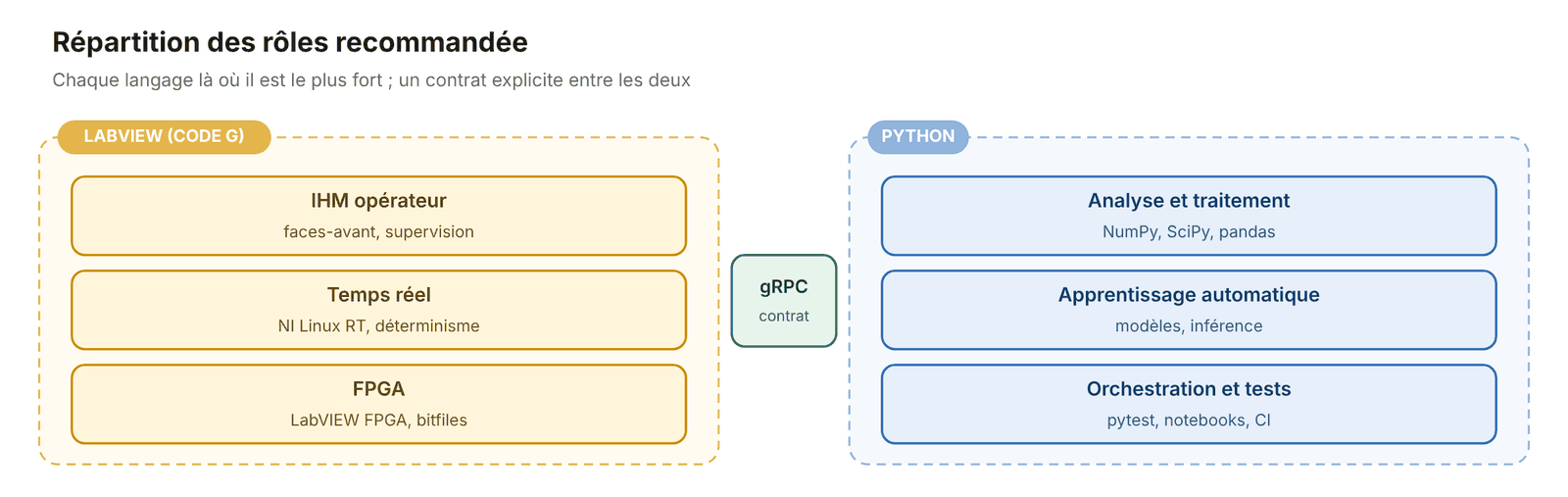
On my test benches, LabVIEW and Python often work together. LabVIEW handles the operator interface, real time and FPGA. Python takes care of data analysis and test automation. There are several ways to make them communicate. Here is what I have learned.
The first question: who is in charge?
Before choosing a solution, I start by asking which software gives the orders.

- LabVIEW calls Python: with the Python Node, built into LabVIEW.
- Python calls LabVIEW: it runs an existing LabVIEW program.
- Two separate programs: each runs on its own and they exchange messages over the network.
- Python alone: it drives NI or other hardware directly, without LabVIEW.
LabVIEW calls Python: the Python Node
This is the simplest way to start. Three rules save me from most problems:
- Open the Python session once, before the loop, not on every iteration. Otherwise the program becomes very slow.
- Exchange simple data: numbers, text, arrays. Complex Python code stays hidden behind a few functions.
- Pin down the Python install: a dedicated Python environment for each application, with the same 32- or 64-bit version as LabVIEW.
In practice, most failures I have run into come not from the code but from the Python installation.
Python calls LabVIEW
When Python runs the tests, it can reuse an existing LabVIEW program in three ways:
- ActiveX: old and Windows-only, but still works.
- A DLL built by LabVIEW: fast, but if the LabVIEW code crashes, Python crashes too.
- An executable launched by Python: simple but slow. Best kept for occasional processing.
Two separate programs
This is what I recommend for a bench that runs for a long time. If one program crashes, the other keeps going. Each can also be updated without touching the other.
- TCP: simple, no extra tools.
- ZeroMQ: more robust, it handles reconnections on its own.
- gRPC: the solution NI promotes. The contract is written in a shared file, and the code on both sides is generated from it.
- HTTP: slower, but handy for occasional commands.
Contract or API? The contract is the shared document that describes the messages exchanged between two programs: neither of them owns it. An API is the set of functions a piece of software offers to others: it belongs to that software. With gRPC, the contract is used to generate the API on each side.
What about doing without LabVIEW?
NI provides official Python libraries for most of its hardware, such as nidaqmx for data acquisition cards. For a new project with no LabVIEW interface, Python can be enough. NI also lets LabVIEW and Python share the same hardware at the same time, and TestStand can call Python scripts directly.
How to choose
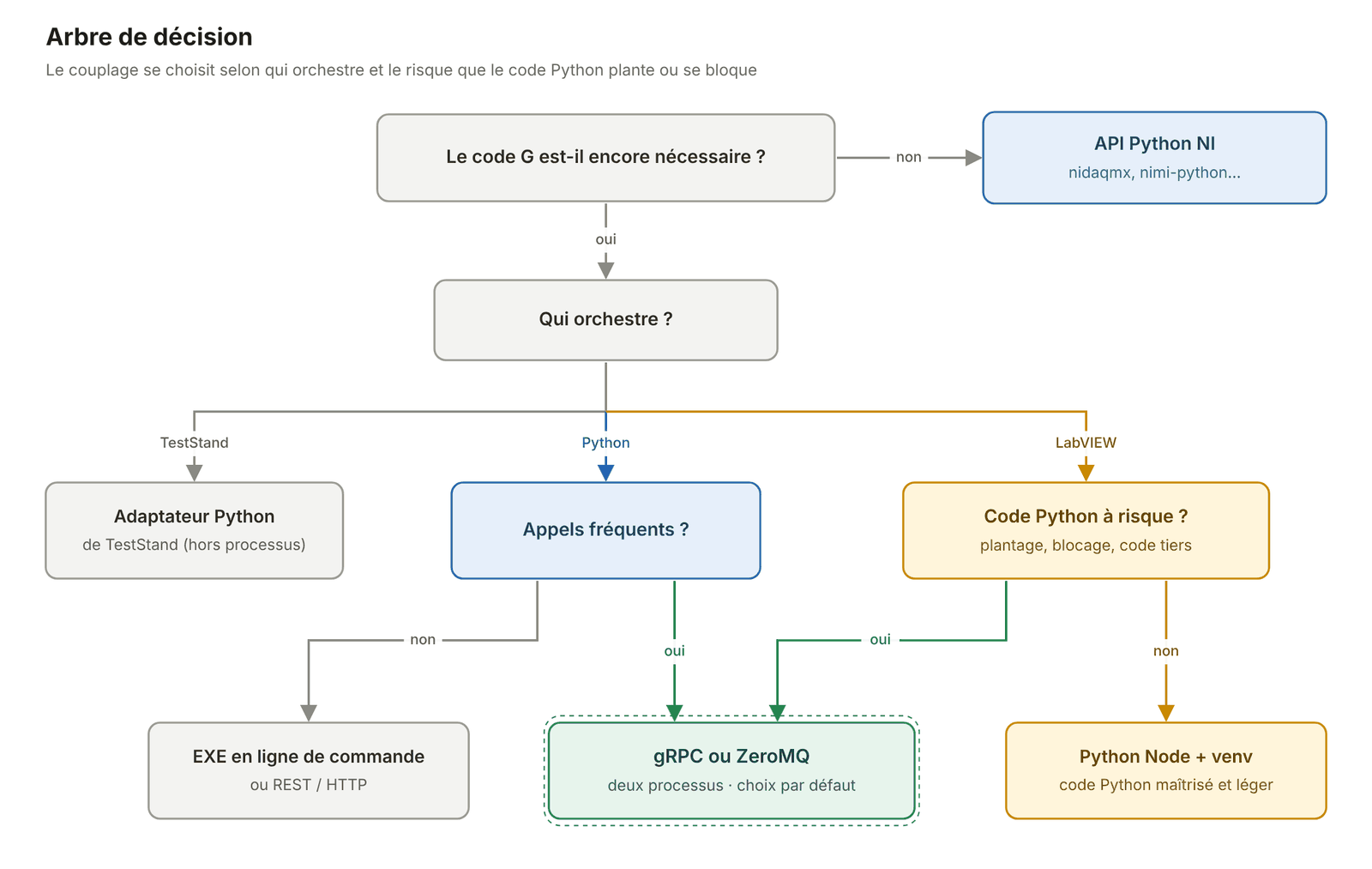
- Prototype or one-off computation: the Python Node.
- Bench that runs for a long time: two separate programs, with gRPC or ZeroMQ.
- Python in charge, infrequent calls: an executable or HTTP.
- TestStand sequencer: TestStand calling Python directly.
- New project with no LabVIEW interface: Python alone.
Key takeaways
- Starting with the Python Node is easy; making it reliable takes discipline with the Python installation.
- For a long-lasting bench, I keep the two programs separate.
- LabVIEW keeps the interface, real time and FPGA; Python, analysis and automation.
Further reading
NI, Python Node, LabVIEW API Reference, ni.com; NI, Python Resources for NI Hardware and Software, ni.com; NI, grpc-labview, GitHub
Did you find this article useful?
Rate it from 1 to 5 stars. Anonymous, no sign-up.
Thank you! Your rating: 1 out of 5. You can change it by clicking another star.
Thank you! Your rating: 2 out of 5. You can change it by clicking another star.
Thank you! Your rating: 3 out of 5. You can change it by clicking another star.
Thank you! Your rating: 4 out of 5. You can change it by clicking another star.
Thank you! Your rating: 5 out of 5. You can change it by clicking another star.
Too many ratings sent in a short time. Please try again in an hour.
Your rating could not be saved. Please try again later.
Comments
No comments yet. Be the first to share your thoughts.